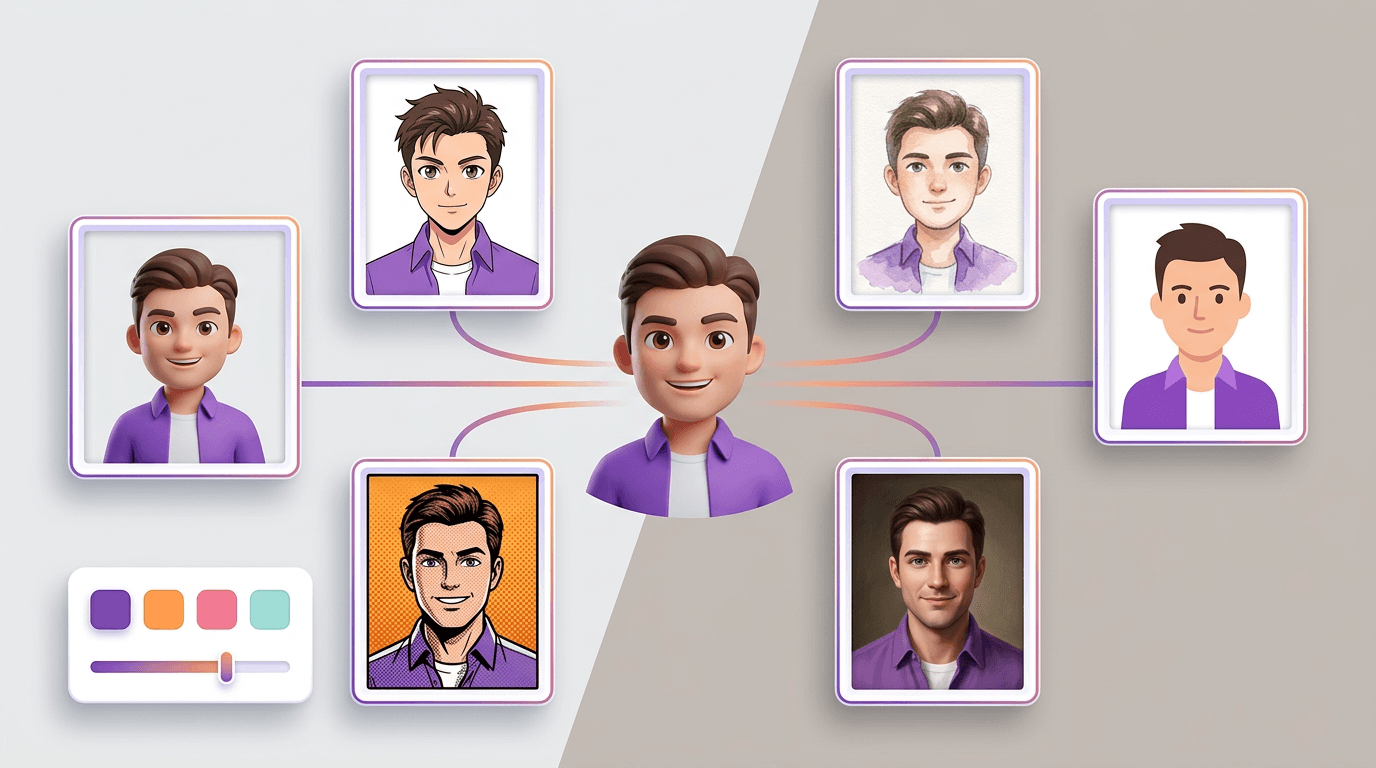
Avatar Studio: Design a Look for Every Specialist
Open a team member, pick an art style, dial in the details, and generate a portrait that actually feels like them. Or describe exactly how you want them to look.
Flockx shows up everywhere: the sidebar, the chat header, every reply, the team page. You see their faces hundreds of times a week. Until now, those faces were the defaults we gave you. Helpful, but not yours.
Avatar Studio changes that. Open any team member, pick the look you want, and get a custom portrait you can apply with one click. Nothing to install, no design skills needed, no prompt engineering.
The Short Version
Go to Team Management, open a team member, and tap Avatar Studio. Choose an art style, pick a few traits, and hit Generate. Preview the portrait, apply it, or regenerate until it feels right. You can reset back to the original avatar any time.
Why Your Team Should Look Like Your Team
When Clara writes in your voice, Maya runs your social, and Eva sorts your inbox, they are doing real work for you. The default portrait is fine for a week. After a month, it starts to feel like a stock photo on a tool you rent - not a teammate you built.
A custom avatar is a small thing that adds up. It makes the team feel yours. It makes the group chat feel like a group. It makes your brand show up in the one place users see most - the people doing the work.
Eight Art Styles, One Click
Start by picking a style. The style is the biggest decision you make because it sets the mood for everything else. Pick one and the whole portrait leans into it.
- 3D Rendered: Clean, modern, Pixar-adjacent portraits. A good default if you want something polished that works for any business.
- Anime: Stylized and vibrant. Perfect for gaming, entertainment, and creator brands that want personality up front.
- Watercolor: Soft edges and artistic brushstrokes. Warm and inviting - great for wellness, lifestyle, and hospitality.
- Minimalist: Flat vector illustration with geometric shapes. Clean and modern - ideal for tech, finance, and design-forward brands.
- Oil Painting: Classical, Renaissance-inspired portraits. Rich, dramatic, and distinguished - a strong match for luxury and professional services.
- Cyberpunk: Neon, holographic, rain-slicked city vibes. Bold and futuristic for tech, gaming, and music.
- Fantasy: High-fantasy RPG character art. Magical auras, dramatic lighting - the pick for storytelling, gaming, and creative worlds.
- Comic Book: Bold ink, halftone dots, dynamic pose. Pop-art energy that lands well for creators and kids-brand content.
Dial in the Details
Once you pick a style, the builder shows you a set of simple controls. No sliders for numbers. No prompt box to worry about. Just tap the look you want.
- Base avatar: Human, alien, robot, or something else you describe in a short line. Most teams stay human. Some go full sci-fi.
- Appearance: A slider from feminine to masculine, with androgynous in the middle. Pick whatever feels right.
- Expression: Confident, friendly, focused, thoughtful, energetic, mysterious, fierce, serene, mischievous, or stoic. Match the role.
- Hair length, hair style, and facial hair: Short, medium, long, and everything from pixie cuts and bobs to locs, braids, cornrows, and full beards.
- Color options: Grids for skin, hair, and eyes. Realistic tones plus stylized picks like emerald, lavender, and glowing neon if you are going beyond human.
- Outfit: Power suits, tech-founder turtlenecks, lab coats, chef whites, and cultural formal wear including sherwani, dashiki, hanbok, kimono, thobe, and ao dai.
- Headwear: Turban, hijab, kufi, kippah, beret, fedora, beanie, cowboy hat, and more.
- Accessory: Glasses, headphones, smartwatch, earpiece, lanyard, coffee cup, tablet, fountain pen, or nothing at all.
Every option is optional. You can pick one thing and skip the rest. The builder fills in the gaps so you always get a finished portrait, not a half-designed one.
A Team That Actually Looks Like a Team
Give each member a distinct expression. Clara with a thoughtful look, Maya with an energetic grin, Otto with a focused gaze. When they show up together in a group chat, you can tell them apart at a glance - the same way you would with real coworkers.
Or Just Describe What You Want
If you already know what you want, skip the builder. Switch to the Custom tab and type a description. "A confident woman in a tailored navy blazer, standing in a modern glass office with a city skyline behind her. Warm golden-hour lighting, photorealistic style." That kind of sentence is enough.
Be as specific or as loose as you want. Art style, clothing, setting, mood, time of day - anything you mention lands in the portrait. If you love the result, apply it. If not, tweak a few words and generate again.
How It Flows
The whole experience fits on one screen so you never lose track of where you are.
- Pick: Choose an art style and tap the traits you want. No form to submit, no save to remember.
- Generate: Tap Generate Avatar. A large preview appears right at the top. The spinner tells you the portrait is being crafted.
- Preview: Look at the result next to the team member’s name. If it fits, apply it. If not, hit Regenerate for a new take with the same traits, or change a trait and try again.
- Apply: One click saves the portrait to that team member. It shows up everywhere instantly - sidebar, chat header, team page, group chats.
- Reset: Changed your mind? Open Avatar Studio again and use the reset option to restore the original avatar. No lock-in.
Built for Every Kind of Team
The option sets are deep. Hundreds of combinations across every style, outfit, and accessory category - so every team member can have a portrait that feels specific, not generic. No digging through menus. No add-on packs.
If your brand has a specific look - a comic-book style for a kids brand, watercolor portraits for a wellness studio, oil paintings for a boutique agency - Avatar Studio lets every team member match that look. Six portraits, one visual language.
What This Means for Your Brand
Flockx is one of the most visible parts of your business. They are in the chat with your customers. They are in your screenshots. They are in your onboarding flow and your team directory. Giving them a look that matches your brand is not a cosmetic choice - it is the first thing a new user notices.
Avatar Studio is live now. Open Team Management, pick a team member, and spend two minutes designing a portrait that actually feels like them.
Ready to Design Your Team?
Open Team Management. Pick a team member. Hit Avatar Studio and build a look that feels like yours.