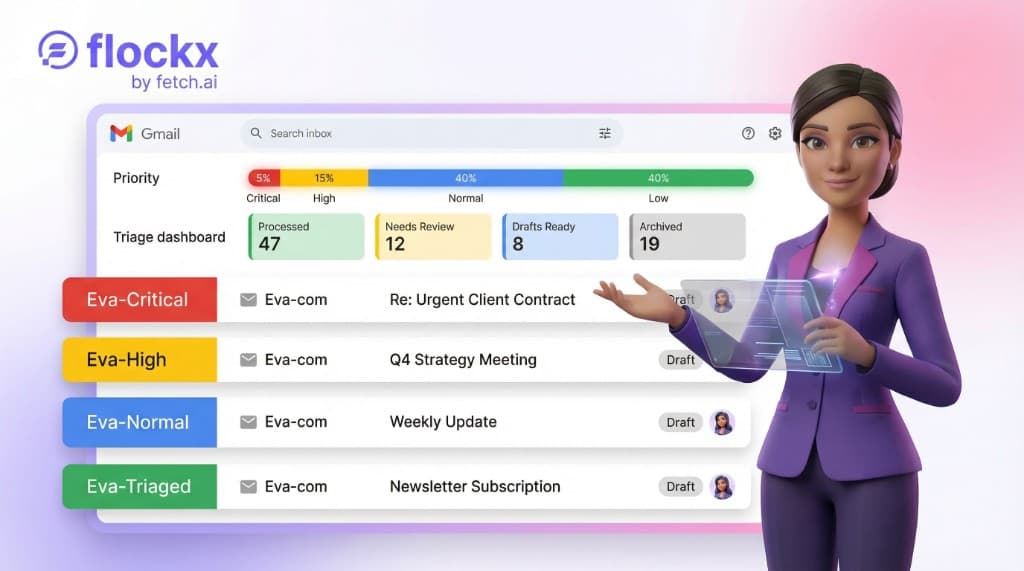
Smart Inbox: Inbox Zero Every Morning
Connect your Gmail. Eva reads every message, labels by priority, drafts replies for the important ones, and archives the noise. You just review what matters.
You open Gmail at 8am. There are 47 new messages. Three of them actually need your attention. The rest? Newsletters, receipts, marketing pitches, and that one thread your team keeps replying to with "sounds good."
Finding the three that matter takes 20 minutes. Responding takes another 30. By the time you close your inbox, an hour is gone and you have not started on the work that actually moves your business forward.
Smart Inbox is here. Eva, your AI Executive Assistant, now connects directly to your Gmail and handles the sorting before you ever open it.
The Short Version
Connect Gmail. Eva reads every incoming email, classifies it by priority, applies labels, drafts replies for the ones that need a response, and archives the noise. You open your inbox to a clean, organized view with drafts waiting for your review. This feature is currently in beta.
The Problem with Email
The average professional spends 2.5 hours per day managing email. For creators and solopreneurs, that number is often higher because the inbox is not just communication: it is where partnerships arrive, contracts land, and client relationships live.
The problem is not the important emails. It is the 80% of messages that do not need your attention but still demand your time to sort through. Every newsletter you scroll past, every promotional email you archive, every notification you dismiss: they all cost you cognitive energy that should go toward creating.
Most email tools try to solve this with filters and rules. But filters are brittle. They break when senders change subject lines, they miss context, and they cannot tell the difference between a routine invoice and an urgent contract renewal from the same sender.
How Smart Inbox Works
Smart Inbox is different because Eva actually reads your email. Not keyword matching. Not rule-based filtering. Eva reads the content of each message, understands the context, and makes a judgment call about what it is and how urgent it is.
- Priority classification: Every email gets sorted into critical, high, normal, or low priority based on its actual content, not just the sender or subject line.
- Smart labeling: Eva applies Gmail labels (like eva-critical, eva-high, brand-partnerships, contract-renewal) so your inbox is organized by category and urgency.
- Draft replies: For emails that need a response, Eva writes a draft in your voice and tone. It learns your writing style from your sent mail so the drafts sound like you, not a robot.
- Noise removal: Low-priority emails like newsletters and notifications get labeled and archived. They are still there if you want them. They are just not cluttering your view.
Setup Takes Three Minutes
Getting started is straightforward. Connect your Gmail, set your rules, and activate Eva. That is the entire setup.
- Connect Gmail: One-click connection through a secure integration. Eva gets read access to sort and label. She never sends anything without your approval.
- Set your rules: Tell Eva what matters most to you. Contracts and legal? Critical. Client messages? High. Newsletters? Low. You set the priority rules, Eva applies them.
- Activate: Eva starts processing. Within minutes, your inbox is labeled, prioritized, and ready for you to review.
Eva also calibrates to your writing style automatically. On her first run, she reads a sample of your sent mail to understand your tone, your word choices, and how you structure replies. The drafts she writes sound like you wrote them, not like a template.
What Your Inbox Looks Like After
Open Gmail. Everything is sorted. Critical items at the top with an "eva-critical" label and a star. Partnership inquiries and client messages flagged as high priority with draft replies waiting. Routine messages labeled and filed. Newsletters archived.
You are not scanning 47 messages anymore. You are reviewing 5 or 6 that actually need you. The rest have been handled.
What a Typical Morning Looks Like
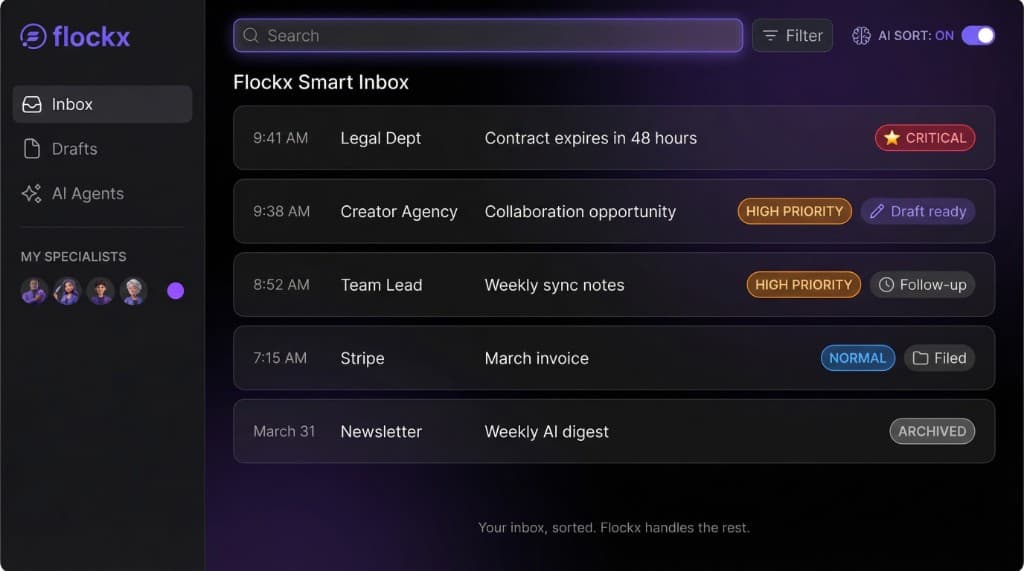
The critical contract is front and center. The newsletter did not even make it to your morning view. Eva made those calls because she read the content of each message, not because someone wrote a filter rule three months ago.
You Stay in Control
Eva handles the sorting. You make the calls. Nothing gets sent without your approval. Every draft reply waits for your review before it goes anywhere. Every label is visible in your Gmail. Every archived email is still accessible.
- Approval required: Eva never sends an email on your behalf. Drafts wait for you to review, edit, and send.
- Custom rules: You define the priority rules and categories. Eva follows your framework, not a generic one.
- Works with your Gmail: Smart Inbox works inside your existing Gmail. No new app to check, no new interface to learn.
- Privacy first: Emails are processed for classification and not stored. You can disconnect at any time.
Eva Gets Smarter Over Time
The first time Eva processes your inbox, she starts with your priority rules and her own judgment. As she processes more emails, she learns the categories that matter to your work. A podcaster's inbox looks different from a consultant's, and Eva adapts to that.
She discovers patterns in your email: which senders consistently send high-priority content, which types of messages are always noise, and which categories keep appearing. Those patterns get folded into future runs so the sorting gets more accurate over time.
And because Eva learned your writing style from your sent mail, the draft replies improve too. The more you use Smart Inbox, the less editing you need to do before hitting send.
Getting the Best Results
Set clear priority rules when you first configure Smart Inbox. The more specific you are about what matters most (contracts, client messages, partnership inquiries), the better Eva's initial sorting will be. She refines from there.
What This Means for Your Morning
Smart Inbox gives you your morning back. Instead of spending the first hour of your day sorting email, you spend five minutes reviewing what Eva flagged. The contract that expires Thursday is at the top with a draft reply ready. The collaboration offer from the YouTube channel has a personalized response waiting. Everything else is labeled, filed, or archived.
You did not build a career creating things so you could spend half your day managing an inbox. Smart Inbox makes sure you do not have to.
Ready to Take Back Your Inbox?
Connect Gmail. Set your rules. Eva handles the rest.